The fix wasn't a better spline tool — it was a better-shaped problem
A small engineering story about why AI tooling fails on the wrong problems, and what to do about it.
I spent a chunk of last week trying to convince AI to find the centerline of a track.
The setup: I'm building Straylight in Unity 6, and the tracks are assembled from modular pieces — some I bought from the Asset Store, some custom. To make racing work, every track needs a clean centerline running through it. That spline is what AI opponents path along, what the chase camera tracks, what physics uses to wrap the world the right way around the rider. Without it, nothing else works. With a bad one, everything subtly breaks.
The pieces I'm assembling didn't come with that centerline. They came with geometry. So I needed to generate a spline through arbitrary chains of modules — and I needed to do it again every time I built a new track. That's the kind of problem a solo founder cannot afford to solve once. It has to be solved as a tool, not as a task.
What followed was four solutions, in order of how wrong each one was. The fourth one worked, and not for any reason I expected.
Four solutions, one of which worked
Solution 1: Have AI figure it out from the geometry. The first instinct was the obvious one. I had Claude Code take a look at the mesh, compute edges, find the inside walls of a track segment, and infer the centerline from there. Geometrically reasonable. Algorithmically standard. Should have worked.
It mostly didn't. The asset meshes weren't built for that — the edges didn't form clean inner-wall pairs, decorative protrusions confused edge-detection, and corners introduced cases where the centerline would fold or skip. The output looked roughly right at low zoom, but if you actually tried to drive a chase camera along it, the camera would jerk every few meters where the algorithm had guessed badly. Asking AI to interpret messy geometric data is asking it to make a hundred small judgment calls, any one of which can be wrong. And when one is wrong, the whole pipeline breaks.
Solution 2: Hand-build every track. The fallback. Drag control points, eyeball curvature, tweak until it looks right. Works. Takes a half-day per track. Compounds badly when I want to change a module — every time the track changes, the spline has to be rebuilt from scratch. I built one this way to confirm it could be done, and immediately knew it wasn't going to be how I worked. The studio is one person. The math on a half-day per track times the number of tracks I want to ship across multiple worlds, times "and you'll redo most of them when the design evolves" — that math doesn't work.
Solution 3: Try a better spline package. If the tool isn't right, try a better tool. I tried Unity's built-in splines, which are fine for simple cases but limited on fine-grained adjustment. Then I tried Curvy Splines, which has substantially better tooling — control over tangents, segments, mesh extrusion, and a level of editor polish that Unity's native splines don't match yet. I kept Curvy. It's the right chisel.
But the chisel doesn't decide where the marble is. Curvy Splines, like every spline package I tried, assumes you know where the spline goes. None of them solve "given a chain of modular track pieces, where should the centerline run?" That problem has to be solved before any spline tool is useful. This is where it clicked. The first three approaches weren't addressing the actual problem. I was treating "where does the spline go" as something the tool should figure out — by AI inference, by manual placement, or by a smarter package. But the spline path was a property of the asset, and none of my assets carried that property.
Solution 4: Reshape the input. The move was to edit the prebuilt assets themselves.
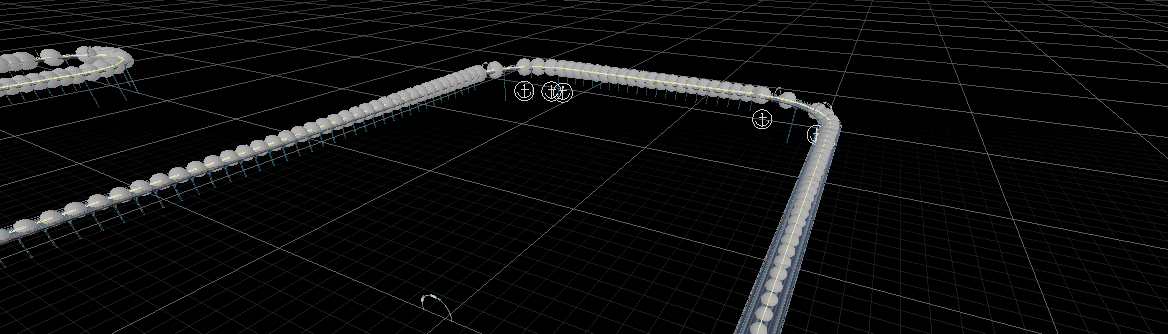
For each modular track piece — purchased or custom — I added a set of empty GameObjects along the path the spline should follow: two for a straight section (entry and exit), more for curves or oddly-shaped modules that need extra waypoints to spline smoothly. All named with a strict, indexed convention. Took five minutes per straight module, a bit longer for the curves.
Then I had Claude Code write a small editor tool. The tool walks the modules in a scene in order, finds the named nodes on each one, builds a Curvy Splines path through them, and smooths the result. Drop modules in the scene, run the tool, get a track-ready spline. Move modules around, run the tool again, get an updated spline. Add a new module, label its nodes, run the tool, and the new piece is fully integrated.
The work that took a half-day per track now takes the time it takes to lay out the modules. The work that was hand-craft is now a tool. And the tool is twenty lines of editor code that Claude Code wrote in a single round trip — because once the input was well-shaped, the algorithm was trivial.
The story isn't really about splines. It's about something I keep learning, in small bruising ways, about how to actually use AI on hard problems. The instinct, when something is hard, is to throw it at AI and ask AI to figure it out. Sometimes that works. More often, AI's failure modes show up exactly where the problem is ambiguous — edge-detection on messy meshes, naming things, interpreting context, making a hundred small judgment calls correctly in sequence. That's where AI is dumb in expensive ways. Confidently dumb, which is the worst kind.
But AI is brilliant at well-shaped problems. Given a chain of modules, walk them in order, find the children matching this naming pattern, return the world-space positions, build a spline through them. That problem isn't hard. There's no ambiguity. There's no judgment. AI writes that tool in one shot, and it works. So the leverage isn't in better prompting. It isn't in waiting for a smarter model. The leverage is in changing the shape of the problem until what remains is something AI can do trivially.
Which means a lot of the actual engineering work, in this kind of pipeline, isn't writing code. It's restructuring data, or naming things consistently, or deciding what gets stored where, until the code is the easy part. This isn't a new lesson, exactly — good engineers have always known that data structures determine code complexity. But the AI version is sharper: data structures determine whether AI can write the code at all. Get the data right, and AI is a multiplier. Hand AI ambiguous data, and you've spent thirty prompts and learned nothing.
Why this matters for what I'm building
Straylight is being made by one person. Every hour spent fighting tooling is an hour not spent on design, on the world, on the actual game. Throughput isn't a vanity metric for a solo studio — it's the difference between shipping the game I want to ship and shipping a smaller version of it.
This kind of tool — five minutes of asset prep per module, twenty lines of editor code, seconds per track to use — directly determines what's possible. AI doesn't make me a better engineer. It makes my throughput scale past what one person should reasonably be able to do, if I do the work of shaping problems for it.
Most of the AI-in-gamedev discourse is either "AI will replace devs" or "AI in games is slop." I find both framings exhausting. The actual situation, day to day, is quieter and more interesting. AI is a productivity multiplier when you've shaped the problem well. It's a fire hose when you haven't. Learning the difference is a skill, not a setting.
What comes next
More tracks. More modules. The tool gets used the next time I sit down to build a level, and the time after that. The spline saga is over.
The bigger thing I'm still working out: how many of my engineering tasks are actually "reshape the inputs so the code becomes easy"? My guess, the more I look, is most of them. Which means I'm probably doing a different job than I thought I was doing.
If you're building anything with AI in the loop and have a story like this — a place where the leverage was in the data shape, not the algorithm — I'd love to hear it. Always more to learn here.